Showing posts with label email address. Show all posts
Showing posts with label email address. Show all posts
How to Create a Gmail Account (Tips to Follow)
♦ by Unknown 0 comments
Google is the famous site in the world. In addition to Google mail they gave the name as Gmail. For creating Gmail account follow given tips.


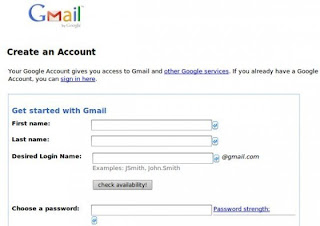


- Go to gmail.
- From there you will see a box with the writing "Create A New Account".
- Then Fill all blank columns.
- Then another page will appear.
- From that page Go to your account.
- Then your account is ready to use.
- Follow these tips given.
How can you use Google Apps for free !(tips to follow)
♦ by Unknown 0 comments

Google is the best site in the world.Google is a service which providing independently customizable versions of several Google products under a custom domain name.It has a number of web applications with similar functionality to traditional office, including: Gmail, Google Groups, Google Calendar, Talk, and Sites.Google Apps is one of it.By following these tips you can create your own email address through Google Apps.

- Go to apps.google.com.
- In solutions take "Google Apps (Free)".
- Then click on the "Get Started" button on the right side of the site.
- Then enter your domain name (site URL).
- After that another page appears.
- Fill every blank column in that page, then click on to "Continue" button.
- Then another page will appear in that page also fill every blank boxes.
- Then it will be almost completed. From there you will get a code. That code paste it in your site DNS (Domain Name System) server.
- Then after 48 hours your email address will be ready.


